
Work From Home Ergonomics: Setups That Prevent Neck & Back Pain
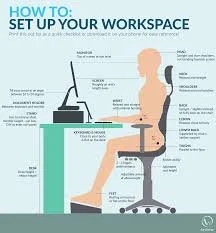
Working from home has plenty of benefits — flexible hours, no commute, and comfy clothes. But for many people, it’s also come with persistent neck, back, and shoulder pain.
At Thrive Physio, we regularly see people who didn’t develop pain overnight — it crept in gradually after months of working from couches, kitchen benches, or poorly set-up desks.
The good news? You don’t need an expensive or perfect workstation. Small, practical changes can make a big difference.
Why Work From Home Setups Cause Pain
Most work-from-home pain isn’t caused by “bad posture” — it’s caused by sustained positions.
When you sit in one position for hours, certain muscles work overtime while others switch off. Over time, this leads to:
Neck and upper back tension
Lower back stiffness
Headaches
Shoulder and wrist discomfort
Even a “good” posture becomes a problem if you stay in it too long.
The Key Principles of Ergonomics (Without the Jargon)
Rather than chasing perfect posture, focus on these simple goals:
Keep your body in neutral, relaxed positions
Reduce unnecessary strain
Change positions regularly
Ergonomics is about reducing load, not eliminating movement.
Desk and Chair Setup: The Essentials
Chair Height
Feet flat on the floor (or a footrest)
Hips slightly higher than knees
Sit back into the chair for support
If your chair isn’t adjustable, a cushion or folded towel can help.
Screen Height and Distance
Top of the screen roughly at eye level
Screen about arm’s length away
Laptop users: raise the laptop and use an external keyboard and mouse if possible
Looking down at a screen for hours is one of the biggest drivers of neck pain.
Keyboard and Mouse Position
Elbows relaxed at your sides
Forearms roughly parallel to the floor
Wrists in a neutral position
If your shoulders feel tense while typing, your desk is likely too high.
Laptop-Only Setups: The Realistic Fix
If you work from a laptop:
Raise the laptop on books or a stand
Use an external keyboard and mouse
Avoid working long hours from the couch or bed
These small changes can dramatically reduce neck and upper back strain.
Standing Desks: Helpful, Not a Cure-All
Standing desks can reduce sitting time, but they aren’t automatically better.
Good standing desk tips:
Screen at eye level
Weight evenly distributed
Comfortable footwear or anti-fatigue mat
Alternating between sitting and standing works better than sticking to one position all day.
Movement Breaks: The Missing Piece
Even the best ergonomic setup can’t compete with regular movement.
At Thrive Physio, we recommend:
Standing or walking every 30–45 minutes
Gentle neck and back movement breaks
Short walks during calls when possible
Movement is often more important than posture.
Simple Exercises That Help During the Workday
You don’t need a full workout at your desk. Simple movements like:
Shoulder rolls
Neck rotations
Thoracic (upper back) extensions
Standing hip flexor stretches
These help reduce stiffness and reset posture throughout the day.
When Ergonomics Isn’t Enough
If pain persists despite a good setup, it may be related to:
Muscle weakness or imbalance
Reduced spinal mobility
Stress and fatigue
Previous injuries
This is where physiotherapy can help identify the real driver of your pain, not just your desk.
At Thrive Physio, we assess:
Your work setup
Movement patterns
Strength and flexibility
Daily habits that contribute to symptoms
Final Takeaway
You don’t need a perfect home office — you need a functional setup that allows movement.
A few thoughtful adjustments, combined with regular breaks and the right exercises, can significantly reduce neck and back pain when working from home.
If discomfort is affecting your work or daily life, a physiotherapist can help you build a setup — and a body — that works better for you.